Showing posts with label student life. Show all posts

Thursday, August 28, 2014

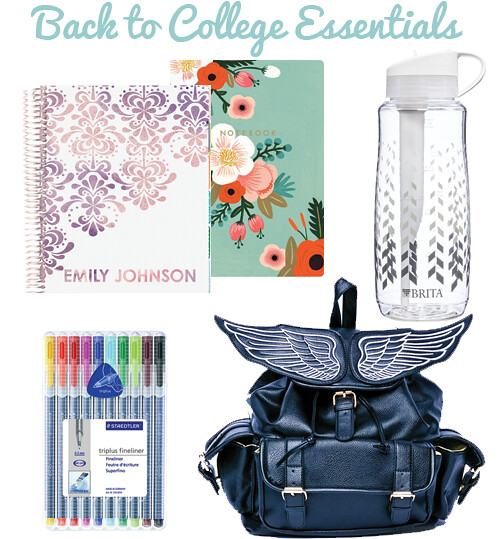
Back to College Essentials

This is a Sponsored post written by me on behalf of Brita. All opinions are 100% mine.
Back to College Essentials

One of my favorite parts of going back to school is back to school shopping. I'm obsessed with school supplies and trying new brands is so exciting for me. By now, in my final year of graduate school, I've finally nailed down the essentials for the day-to-day college student. Staying organized and taking care of yourself are key to having a great school year.

1. Erin Condren Life Planner - Planners have been a life saver for me in college. I've tried many different styles and brands, but for now, I'm loving the Erin Condren Life Planner. It's visually appealing and has plenty of space to plan to do lists for each day. You can also get a totally custom cover!

2. Botanicals Notebook Collection - Having cute notebooks motivates me to use them more, and this pack is the perfect size to tuck into my planner.

3. BritaⓇ Filter Bottle - I try my best not to use plastic water bottles since they are so terrible for the environment (and for local economies where the water is harvested - watch the documentary Tapped if you're curious!). I love BritaⓇ's water filter pitchers at home, but these bottles - available at Target - are the perfect solution on-the-go. Because it has a built-in filter, the BritaⓇ filter bottles are convenient and can remove impurities from water anywhere on campus.

4. Staedtler Triplus Fineliner Pens - These are my favorite pens by far! The container flips around so the container can stand on its own. The rainbow colors are perfect for color coding assignments.

5. Dolls Kill Angel of Mine Backpack - It took years, but I'm finally using a backpack instead of a tote bag. It's so much better for your health - carrying your laptop, textbooks, and other supplies can wreck your back. I love this backpack because it's cute and functional - so many pockets!

What are your back to college essentials?

Visit Sponsor's Site

Tuesday, August 26, 2014

Read it Forward

Read it Forward with McGraw-Hill Education

It's back to school season! I've started my last year of graduate school, which means this is the last time picking out cute notebooks and supplies, my last first day of class, and my last time buying textbooks.

Okay, so buying textbooks is usually a pretty boring experience - find the cheapest price and click "buy," right? But this year, McGraw-Hill Education is introducing a new product - SmartBooks! The SmartBook is the first textbook to allow for adaptive reading and learning, modifying your experience based on how each student individually learns and absorbs information.

Read it Forward with McGraw-Hill Education

I was given a SmartBook to try out, and it was a really interesting experience! The book automatically highlights the most important concepts, and at the end of each chapter, you test your knowledge. Then, the book adapts based on what areas you need to focus on. The interface is really great for a digital textbook - when you are reviewing at the end of the chapter, you can easily reference the text itself. Plus, studies have proven that the SmartBook can improve student performance by at least a letter grade.

Choosing a SmartBook can help you learn, but McGraw-Hill Education is also pledging to donate a textbook to children in need for every SmartBook purchased by October 31, 2014. You can also use the code FORWARD14 to get 15% off your SmartBook purchase to make textbook shopping more affordable. For more information, be sure to watch the video below or visit the website.


Would you try a SmartBook?

Disclosure: This post is sponsored by McGraw-Hill Education. All opinions are my own!

Wednesday, October 2, 2013

5 Easy Ways to De-stress in Under 10 Minutes

It's hard to be productive when you are stressed out. I'm nearing finals for my program (our courses are only 7 weeks!) and other students are approaching midterms. Eek! If you're looking for ways to de-stress quick, don't worry - I got you covered! I polled my Facebook and Twitter friends, added in my own experience and recommendations, and came up with this list -- here's 5 ways to calm down and get focused.

5 Easy Ways to Destress in Under 10 Minutes

Fit in a quick yoga session! My favorite free yoga sources are Tara Stiles, Sarah Beth, and YogaYak. If you can spare $8 a month (way less than a single class!), Black Swan Yoga has amazing yoga channels on their website. You'll be blissed out in no time.

5-minute dance party or dramatic sing-a-long. Throw on some female power ballads (a la Chelsea) or any of your favorite music and go nuts! We like to take a 30-second dance break to do the Yes dance during one of my study groups. It always totally refreshes and refocuses us on the project, plus it's super fun! At home, I like to grab my hoop and dance to a song or two before getting back to work.

Brew tea. This was suggested by two of my friends, Jamie and Emily, and I totally agree! Even the process is soothing - watching the pot slowly boil, the color slowly steep into the tea, the steam floating off the top. Perfection! Plus, tea is known to be relaxing and has a host of health benefits. Get sipping!

Practice breathing. Pranayama breathing is a yogaic breathing style that is extremely relaxing. I have an app on my phone, simply called Pranayama, that tells you when to breathe in, pause, and breath out. I use it to help me fall asleep if I have a ton on my mind. (Also recommended by Ayanna!)

Be social. In real life, not on Twitter! This means talking to your roommate, calling up your mom, or even petting your puppy like Jelfish. It can help you work out your problems to talk out loud, or even just get your mind off of them.

What's your favorite way to de-stress?


Friday, January 11, 2013

What I Did: Touring St. Edward's University

St. Edward's University in Austin, TX
The main building.

I've been spending some time relaxing in Austin before I head back for my final (!) semester as an undergraduate. I'm applying to a program at St. Edward's University in Austin, so while I was in town, I made an appointment to talk to someone in the admissions team.

I decided to bring my camera and take some photos. If you haven't seen photos of St. Ed's, you are missing out! The school looks like Hogwarts brought to life, and it is amazing. I'll let the photos do the talking.

St. Edward's University in Austin, TX St. Edward's University in Austin, TX
St. Edward's University in Austin, TXSt. Edward's University in Austin, TXSt. Edward's University in Austin, TX
St. Edward's University in Austin, TX
That's the Austin skyline! St. Edward's is on a hill overlooking the city.


Instagramming!
Instagram!
Black and White

I wore something casual to my appointment and later shopping. I have been wearing versions of this outfit a lot this break! I will throw on a different pair of shoes or boots, add a scarf and hat if it's cold, or change out the pants for a skirt and tights. The white t-shirt and black cardigan have been incredible versatile, especially since the weather has been fluctuating from cold to warm.

Outfit Details
Bow: Claire's | Cardgian, shirt: Target | Jeans: Express | Shoes: Urban Outfitters (gift)

Tiger Shoes
Rawr!
These tiger shoes were a Christmas gift from my grandmother! I adore them. They are exactly the right amount of quirky without being too much. 

I can't believe classes start again on Monday. Even though it feels like the break flew by, I am excited to start up my final semester as an undergraduate student!

Monday, December 10, 2012

Student Life: How to Use Dropbox to Organize School Files

I'm a virgo. That means that everything has to have a system, especially for digital files for school. I have spent too many hours of my life searching for where I saved that paper, digging through my purse for my flashdrive, or lamenting over Windows Automatic Updates causing me to lose my work. Argh!

I now have a special system just for digital school files, using one of my favorite technologies: Dropbox. Dropbox uses cloud technology, meaning you can access it from anywhere with an internet connection. I save files on Dropbox directly and then I don't have to worry if I have emailed it to myself or if the most updated copy is on my laptop, flashdrive, or elsewhere.

I could wax poetic about Dropbox, but instead, I'll just show you my system.

dropbox 1

This is what you see in the web client, but I mostly just use it directly in Windows Explorer on my laptop. No clutter it the main folder -- just files! I have four folders: Personal, Photos, Public, and UTD. 

dropbox 4


Clicking through  UTD, you will find a list of semesters -- I just started using Dropbox for school in Spring 2012, as you can see! 


dropbox 2

Under each semester, each course has its own folder, organized by course title. I use the course numbers rather than the full course name so it's quick to glance and click the correct one.

dropbox 3

Within each folder, I also try to keep my files organized. It only takes a few seconds to name each file in a way that makes it easy to find later on. If I update files, I don't ever have to save a new one with a new name because Dropbox allows you to revert to older versions later on if you need to, which saves a lot of hassle!

dropbox 5

If you are doing a group project or need to share a file, you can also share it easily through Facebook, Twitter, email, or sharing a link. This has been SO helpful in doing group presentations and projects. 

If you aren't using Dropbox yet, I hope I convinced you! It is such a useful tool, either for work, school, or personal life.

How do you keep your computer files organized?

I love hearing new ways to organize my life!

Related Posts Plugin for WordPress, Blogger...